


New analytics capabilities for lean finance teams to replace manual reports




Finance teams capture and verify hundreds of thousands of invoices every quarter. That volume creates a slow, manual job of its own: reporting on it. For teams that run payables with a lean staff, three more challenges stand out.
First, they get stuck in the export loop, pulling raw data from the payables system and then building pivot tables, charts, and analysis by hand every time a new question comes up.
Second, routine questions about approvers, vendors, and duplicate invoices are slow and costly to answer.
Finally, most teams piece together an ERP, spreadsheets, and a separate BI tool, which adds overhead and raises the risk of errors and conflicting versions of the same numbers.
This month, OpenEnvoy launched upgrades that let lean finance teams verify and analyze payables entirely in the platform. We extended Ask OE to analytics, and we launched Essentials and Scale, two consumption-based plans for lean and growing finance teams that include Ask OE.
Analyze payables data in plain language
Ask OE helps payables teams find invoices, jobs, and exceptions by asking questions in plain language. Since we introduced it, demand has grown significantly:
- The number of questions teams ask grew more than 200% month over month. Ask OE removes the friction and time it takes to search multiple sources and follow up with colleagues to answer simple questions.
- Weekly active users of Ask OE more than doubled as teams made it part of their regular workflow and encouraged colleagues to use it.
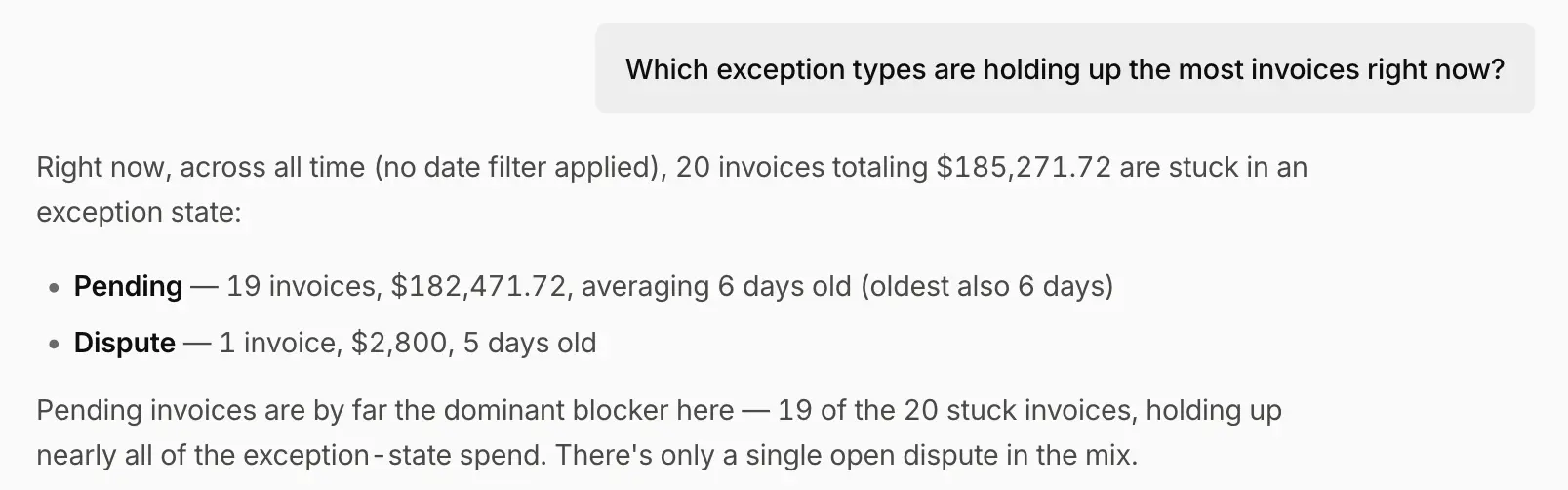
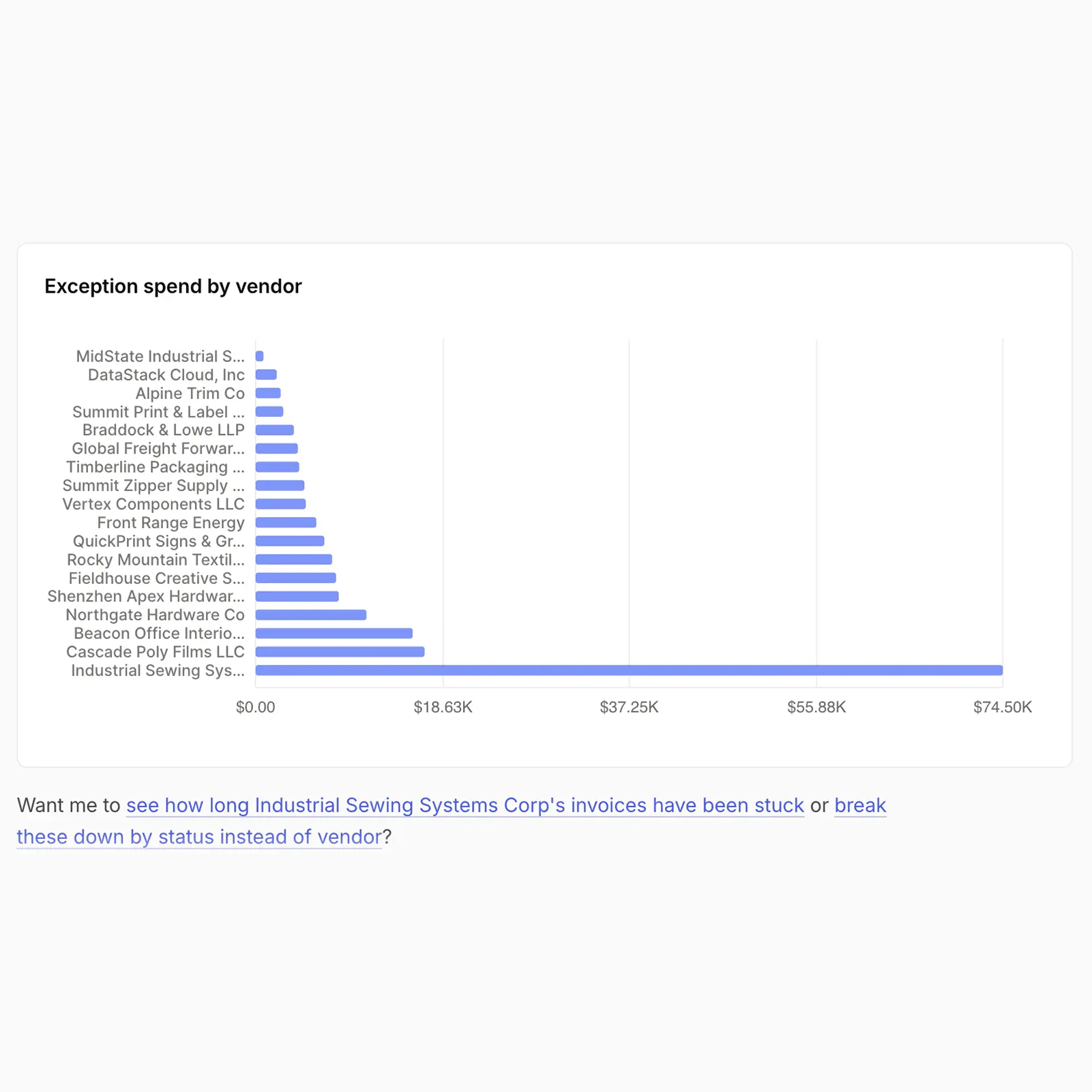
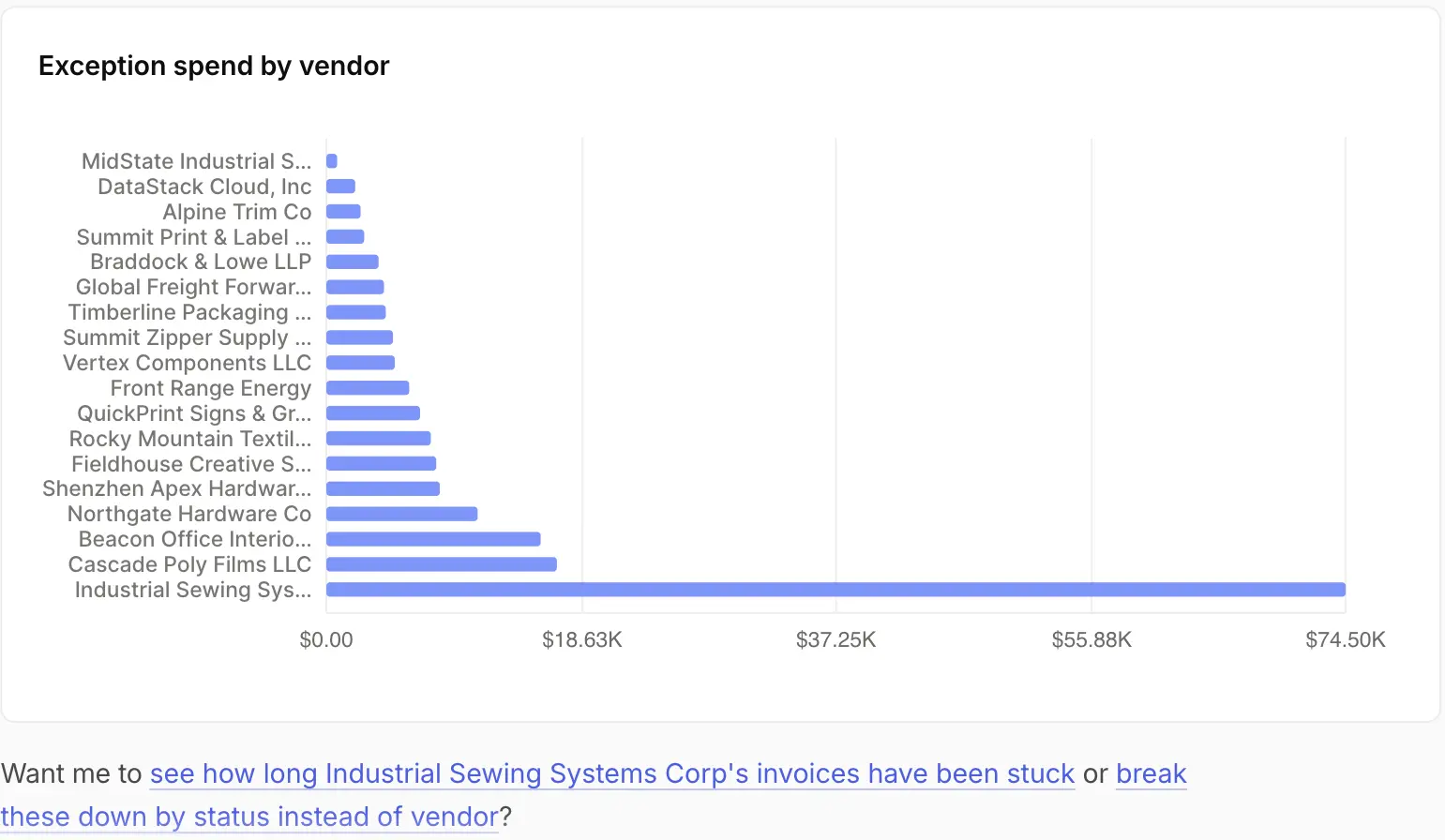
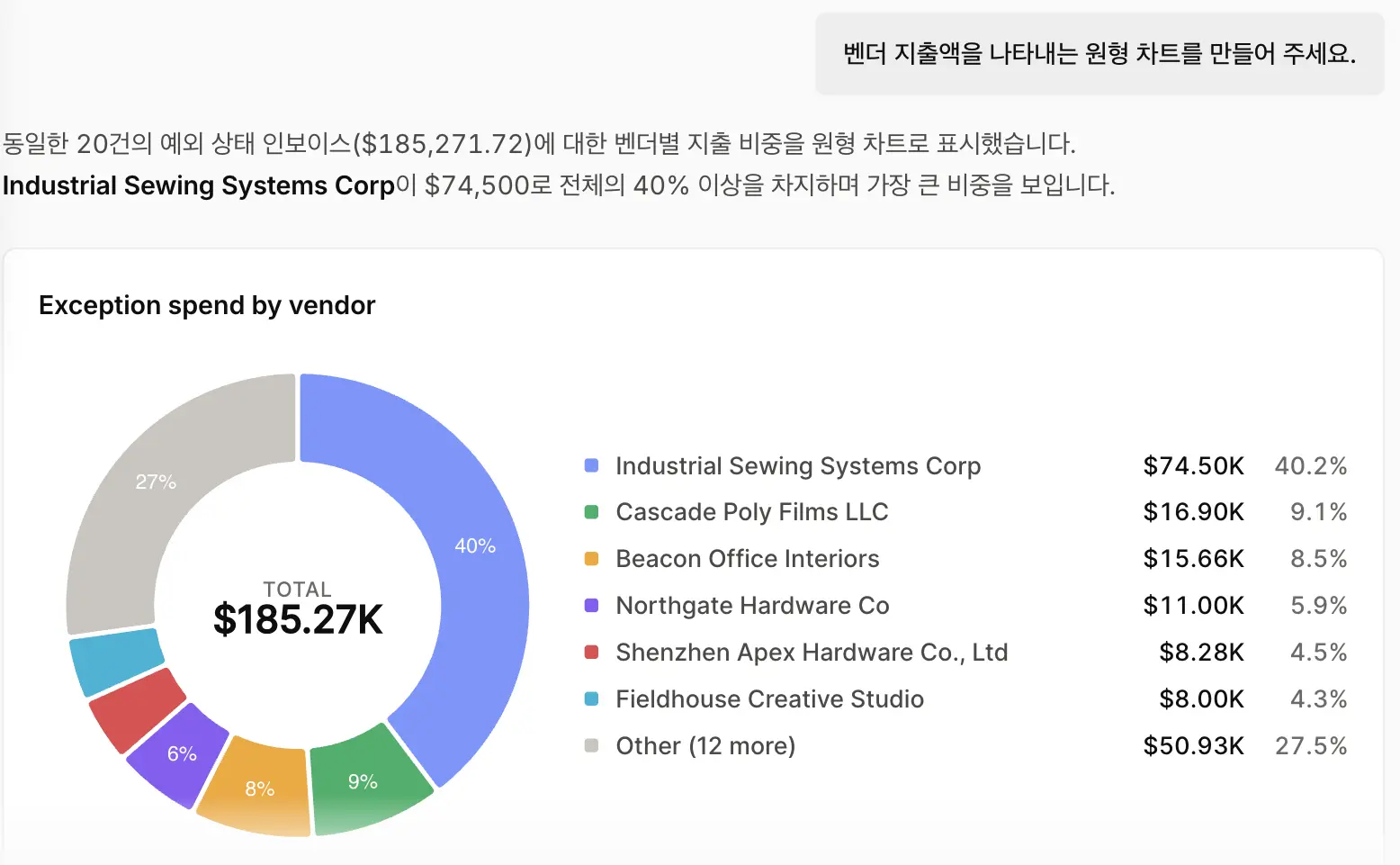
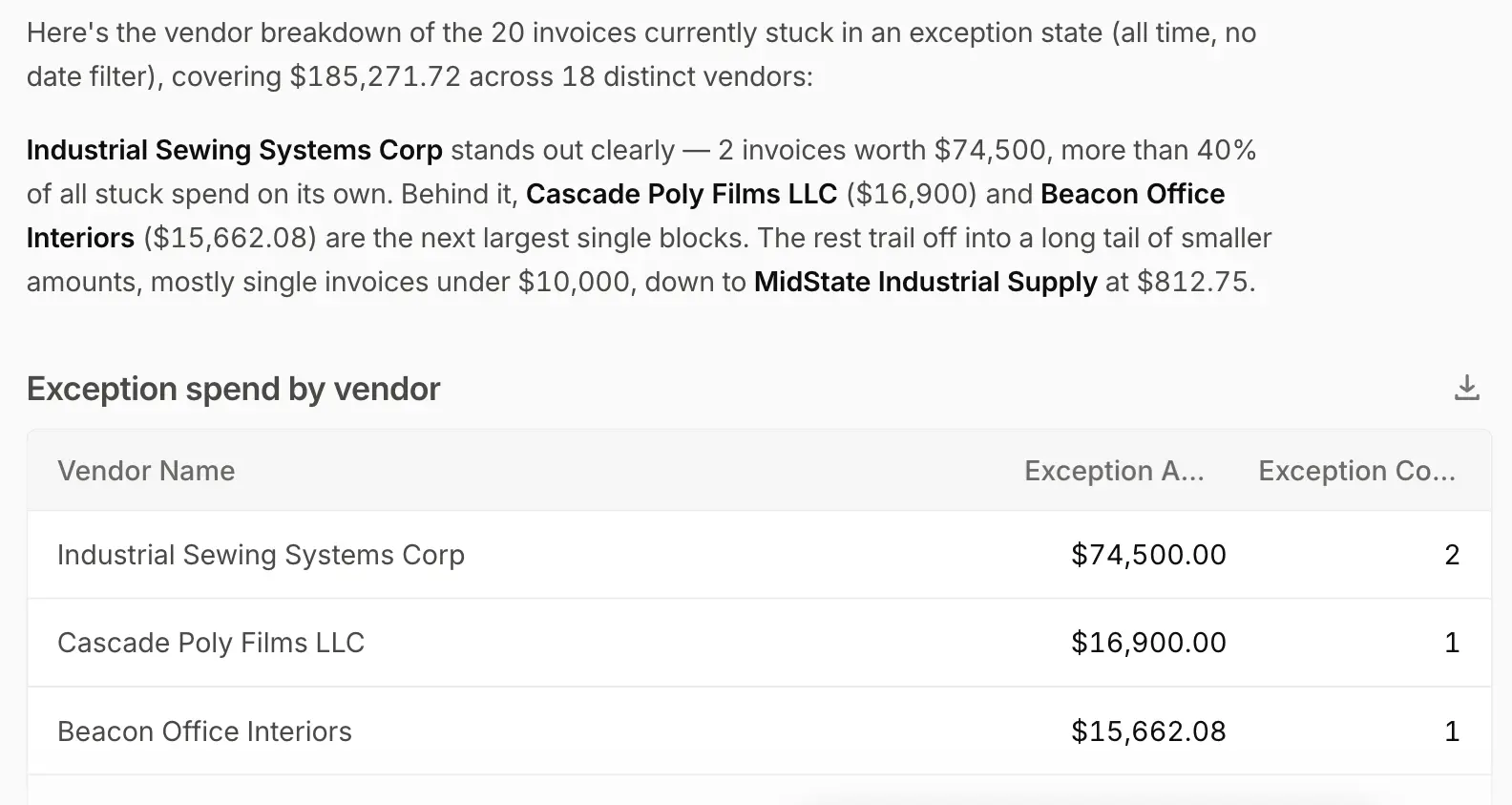
To meet that demand, we extended Ask OE to analytics. Analysts and approvers can now ask Ask OE Analytics a question about their payables data and get the answer in the format they need, from charts and tables to Excel exports. For example, a controller can request every approved transaction over $5,000 and break the results down by final approver, vendor, or operating unit. The team can also pin the chat and re-run it later for a new timeframe. OpenEnvoy determines if the query can run, and for what data, based on the roles and approval policies the company has set. Visit the Ask OE page for full details.
Start on Essentials or Scale with Ask OE included
Essentials is built for lean finance teams ready to start now, with 800 free tokens and Ask OE Analytics from the first day. It works with NetSuite, QuickBooks Online, and other ERPs, and QuickBooks Online connects in one click. OpenEnvoy's team guides each new customer through onboarding.
Scale is built for growing mid-market finance teams with higher invoice volume and multi-step approvals. OpenEnvoy's experts configure the AI's matching to the company's ERP and approval structure, all in typically under 90 days. Scale adds multilingual invoice capture, Ask OE in over 200 languages, organization SSO through Google Workspace or Microsoft AD, and priority email and chat support.
On both plans, teams pay for the tokens the AI uses to capture, match, approve, and answer questions, and unused tokens carry over to later periods. Administrators control which users have access to Ask OE and how many tokens they can consume.
How finance teams use OpenEnvoy to replace custom reports
With Ask OE Analytics included in Essentials and Scale, finance teams capture, verify, and analyze invoices in the same system they use for approvals.
Finance teams with high invoice volumes across many vendors, approvers, and operating units use Ask OE Analytics to answer questions that once required a custom report. At one building services contractor, OpenEnvoy flagged thousands of duplicate submissions in a single quarter. The team now uses Ask OE Analytics to pull a full breakdown by vendor, in both raw text and chart formats, to spotlight where they should focus to reduce duplicate submissions.
A transit technology manufacturer on OpenEnvoy routes invoice approvals across several operating units. Its finance team once relied on a custom-built report to review approved transactions over $5,000. Today the team uses Ask OE Analytics to not only pull the same data, but to further analyze it by final approver, vendor, or operating unit. They pin the chat to easily re-run it with fresh data.
Customers used to ask us to build a custom report every time they wanted a different view of their data, which took time and effort on both sides.
Anna Alley, Account Executive at OpenEnvoy.
Now they use Ask OE and get the answer as a chart or a table instantly, and their own approval policies govern every query.
Get started today
To start on Essentials or Scale with Ask OE Analytics included, book a demo with the OpenEnvoy team.


Serious about protecting your cashflow?

